












#1
·
לפני 13 שנים
[align=left]
This is a little tutorial i wrote on
Setting up FSX across multiple drives for enhanced inflight performance Using Dynamic Linking
you can place a folder in any location
Then make it appear under any directory as if it’s locally there
(Example: My Documents folder on the Desktop)
!Sort of a file system shortcut, but technically it’s not
You can read a bit more about Dynamic linking here
(The idea is to spread the taxing system data (not runway taxi
And spread it across multiple physical drives / reading heads / SSD Channels
This way data needed is read simultaneously through multiple heads / Channels
Relieving processors from governing access turns through
(a single reading head through a single data channel (single cable bandwidth
(the folders in the picture below with the two chain links in them (Orbax & SimObjects
are Dynamic Link Junctions pretending to be local FSX folders
each of these folders is on a separate dedicated physical drive

here's how its done
(install Shell Extension to get added option, detailed info in the link above)


in order to decide which folders to relocate from FSX main directory
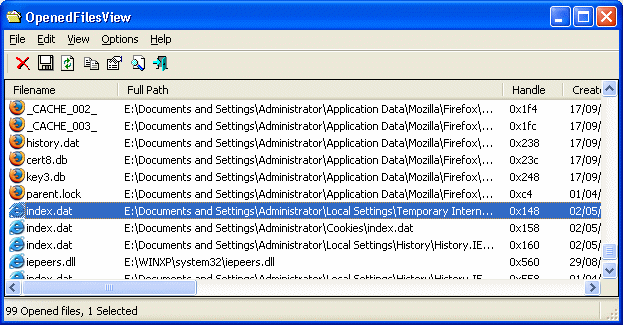
I use this little free utility called "OpenedFilesView" to help identify files in use
(pause the game in mid flight and run the tool (no install needed
analyze the list; then decide which folders contain large files; then allocate the whole folder to another drive
!Download NirSoft OpenedFilesView Here
(!another highly recommended tool to use is DiskTrix UltimateDefrag (Paid Program
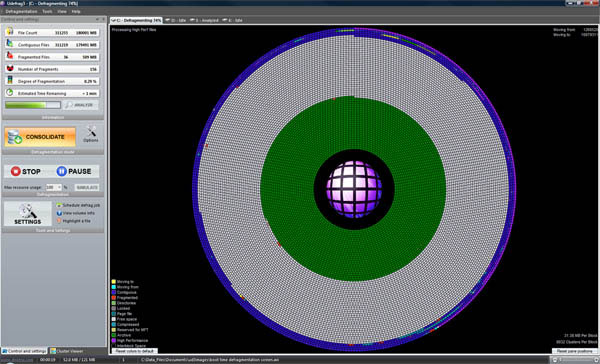
this is the Ultimate when it comes to Defragging your hard drive and files
this is the only program that allows you to control exactly how files are laid out on the hard drive
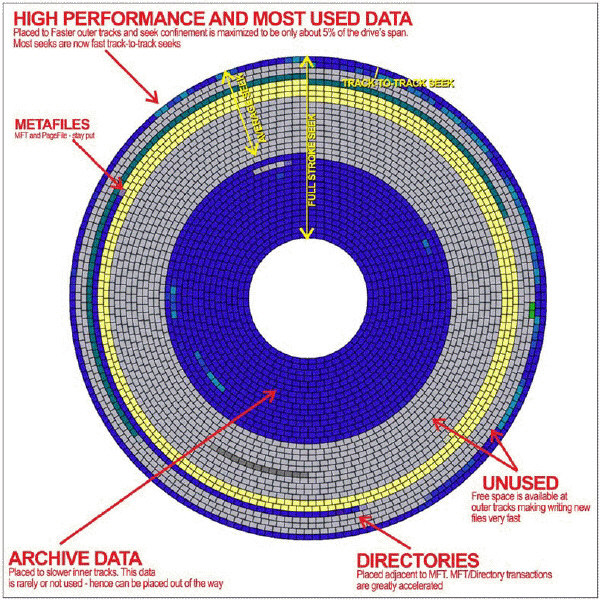
files laid out unfragmented on the most outer tracks will have the highest performing read time
where files read times speed reduces as data written to the more inner tracks
simply because the hard drive head has to travel inward and spin faster
FSX enumerate folders then files every time it runs or needs a file
there is no ini or information file with instruction, this is how fsx works)
(this is why you can just paste most aircraft's directly to root
...due to that fact, its crucial for FSX performance that
(A - files are not fragmented (hard drive doesn't need to seek file parts all over the drive
B - files should be laid out alphabetically on the hard drive; starting from the outer tracks inward
they have a small tutorial on how to further optimize FSX here

Enjoy and have a safe flight
[/align]
This is a little tutorial i wrote on
Setting up FSX across multiple drives for enhanced inflight performance Using Dynamic Linking
you can place a folder in any location
Then make it appear under any directory as if it’s locally there
(Example: My Documents folder on the Desktop)
!Sort of a file system shortcut, but technically it’s not
You can read a bit more about Dynamic linking here
(The idea is to spread the taxing system data (not runway taxi
And spread it across multiple physical drives / reading heads / SSD Channels
This way data needed is read simultaneously through multiple heads / Channels
Relieving processors from governing access turns through
(a single reading head through a single data channel (single cable bandwidth
(the folders in the picture below with the two chain links in them (Orbax & SimObjects
are Dynamic Link Junctions pretending to be local FSX folders
each of these folders is on a separate dedicated physical drive
here's how its done
(install Shell Extension to get added option, detailed info in the link above)
in order to decide which folders to relocate from FSX main directory
I use this little free utility called "OpenedFilesView" to help identify files in use
(pause the game in mid flight and run the tool (no install needed
analyze the list; then decide which folders contain large files; then allocate the whole folder to another drive
!Download NirSoft OpenedFilesView Here
(!another highly recommended tool to use is DiskTrix UltimateDefrag (Paid Program
this is the Ultimate when it comes to Defragging your hard drive and files
this is the only program that allows you to control exactly how files are laid out on the hard drive
files laid out unfragmented on the most outer tracks will have the highest performing read time
where files read times speed reduces as data written to the more inner tracks
simply because the hard drive head has to travel inward and spin faster
FSX enumerate folders then files every time it runs or needs a file
there is no ini or information file with instruction, this is how fsx works)
(this is why you can just paste most aircraft's directly to root
...due to that fact, its crucial for FSX performance that
(A - files are not fragmented (hard drive doesn't need to seek file parts all over the drive
B - files should be laid out alphabetically on the hard drive; starting from the outer tracks inward
they have a small tutorial on how to further optimize FSX here
Enjoy and have a safe flight
[/align]
נערך לאחרונה: לפני 13 שנים